
If you installed watchOS 27 hoping for a fresh crop of watch faces, you’re probably still swiping through the same lineup you had before. There’s no new face bundled with the initial release — at least not yet. But that hasn’t stopped me from falling back in love with an old favorite: Modular Ultra, the complication-packed face that’s exclusive to Apple Watch Ultra.
What makes Modular Ultra interesting isn’t just what it can do — it’s how differently it can look depending on how you set it up. Configure it one way, and it’s a clean, minimal dial with just the time and a couple of essentials. Configure it another way, and it becomes one of the densest, most data-rich watch faces Apple has ever shipped. In this guide, I’ll walk through both approaches, show you how to customize Modular Ultra yourself, and cover what’s rumored to be coming to standard Apple Watch models in a future watchOS 27 update.
A More Modular, Less Ultra Version of Modular Ultra Face
Modular Ultra has a reputation for being overwhelming. It was originally built for divers, hikers, and endurance athletes who wanted every possible metric visible at a glance. But that same face can also be scaled back into something far calmer — and that restrained version is what I’ve been wearing daily.
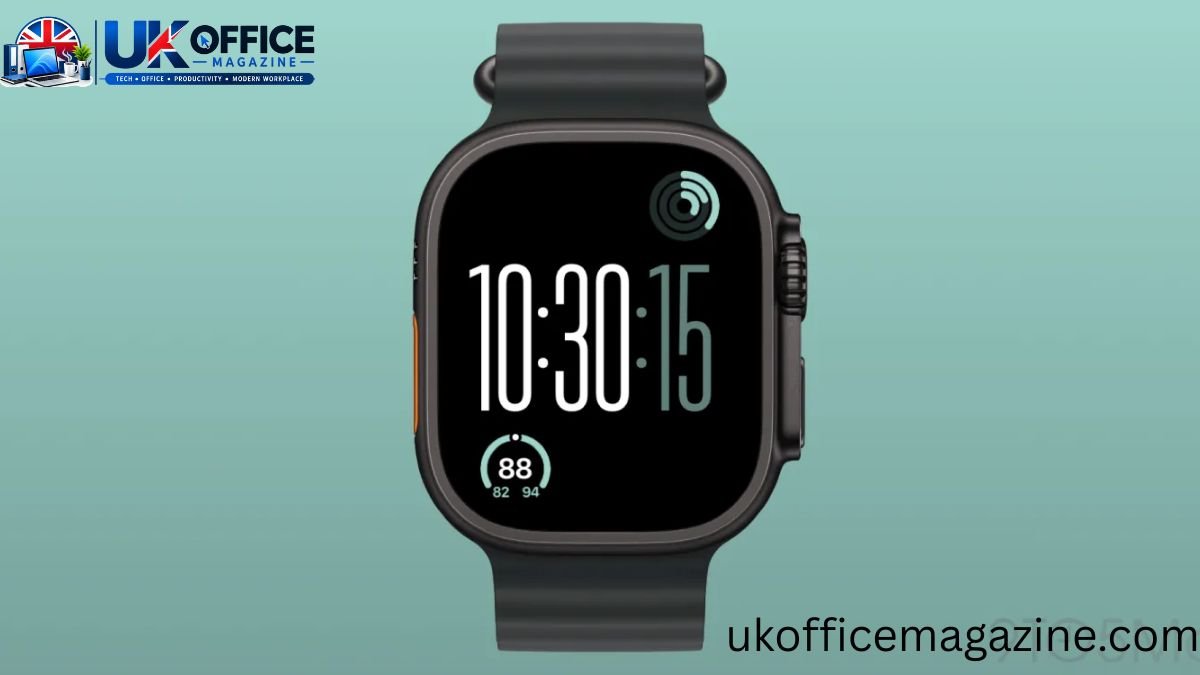
My Stripped-Down Setup
Rather than filling every available slot, I’ve leaned into negative space. Here’s how my current configuration breaks down:
- Time display: Large size, with seconds always visible — a nice touch on Apple Watch Ultra 3, since the seconds hand stays on screen even in always-on mode.
- Bottom-left complication: Current temperature, along with the day’s low and high.
- Top-right complication: Activity rings most of the time, though I’ll occasionally swap it for UV index depending on the season.
- Remaining four complication slots: Left empty on purpose.
That last point is the key to why this setup works so well. Leaving four of the smaller complication slots blank creates a kind of diagonal balance across the face — information in two opposite corners, open space everywhere else. It reads less like a dashboard and more like a clean digital watch that happens to know the temperature.
There’s one quirky side effect of running Modular Ultra in this minimal mode: the red notification dot. Because its position is designed around a top-center complication slot that I’m not using, the dot doesn’t sit dead-center the way it would on a simpler face. It’s a small thing, but it’s part of what makes this layout feel a little different from a standard watch face — and honestly, I’ve grown to like the quirk rather than see it as a flaw.
You Can Configure Modular Ultra With Way More Data
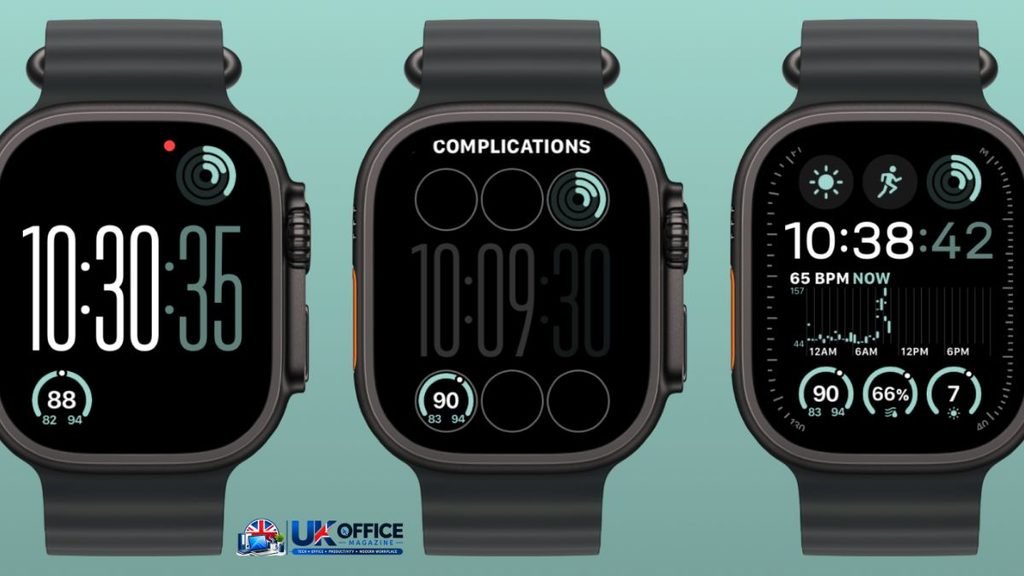
The beauty of Modular Ultra is that the stripped-down look I described above is just one end of the spectrum. At full capacity, this face can hold more live information than almost any other Apple Watch design.
Here’s what the fully loaded version of Modular Ultra can display at once:
- Six compact complications arranged around the dial
- One medium-sized complication positioned beneath the smaller clock display
- A data-rich bezel ring that can show seconds, depth, elevation, or training load
That bezel ring is really what sets Modular Ultra apart from every other face on Apple Watch. No other built-in design lets you wrap that much contextual, activity-specific data around the outside edge of the screen.
Minimal vs. Fully Loaded: A Quick Comparison
| Feature | Minimal Setup | Fully Loaded Setup |
| Complication slots used | 2 of 6 | 6 of 6 |
| Medium complication | Not used | Enabled |
| Bezel data | Not used | Seconds, depth, elevation, or training load |
| Best for | Everyday wear, glanceable info | Workouts, hikes, dives, endurance training |
| Visual feel | Calm, minimal, balanced | Dense, data-forward, athlete-focused |
| Notification dot position | Slightly off-center | Centered |
Neither setup is objectively “better.” The fully loaded version genuinely earns its reputation as one of the most functional sports watch faces available — it’s the reason a lot of people justify buying the Ultra over a standard Series model in the first place. But for day-to-day use, when I’m not training or tracking a specific activity, the pared-back version gives me what I actually look at: the time, the temperature, and my rings.
How to Customize Modular Ultra on Your Apple Watch
If you want to build your own version of this face, the process only takes a minute or two.
- Press and hold the current watch face until you see the face gallery, or find Modular Ultra in the Face Gallery if it isn’t installed yet.
- Tap Edit (or firmly press, depending on your watchOS version) to enter customization mode.
- Swipe to select the clock style, choosing between the available time-display sizes.
- Tap each complication slot — including the bezel — to assign the data you want, or leave slots blank for a cleaner look.
- Turn the Digital Crown to adjust color options if you want to tint the face.
- Press the Digital Crown to save your changes and return to the watch face.
You can also make these same edits from the Watch app on your iPhone, which some people find easier than tapping through small complication slots directly on the wrist.
watchOS 27 Watch Face Rumors: What’s Coming Next
Even though watchOS 27 didn’t ship with new faces at launch, there’s credible reporting that a Modular Ultra-inspired design is being tested for standard Apple Watch Series models. According to Bloomberg’s Mark Gurman, Apple is developing a simplified version of Modular Ultra — sometimes referenced under the watchOS 27 codename “Orchid” — built for devices that don’t have the Ultra’s larger display.
Here’s how that rumored design compares to the existing Ultra-exclusive version:
| Element | Current Modular Ultra (Ultra only) | Rumored Simplified Version (Series) |
| Large clock | Fills top portion of display | Fills top two-thirds of display |
| Center complication | Available | Removed |
| Row above the time | Three small complications | Removed |
| Bezel data ring | Available | Removed |
| Row below the time | Not applicable | Three small complications |
| Device availability | Apple Watch Ultra only | Reportedly standard Series models |
If this design ships, it would mark one of the first times Apple has brought a version of an Ultra-exclusive face down to the rest of the lineup — something Series owners have been requesting for years. Nothing is official yet, and Apple hasn’t confirmed a release timeline, so treat this as a rumor rather than a certainty until Apple says otherwise.
Frequently Asked Questions
Is Modular Ultra exclusive to Apple Watch Ultra?
Yes. As of watchOS 27, Modular Ultra is only available on Apple Watch Ultra models, though a simplified version for standard Apple Watch Series devices is reportedly in testing.
Are there new watch faces in watchOS 27?
Not at launch. watchOS 27 didn’t introduce new watch faces initially, though Apple has a history of adding faces in later point updates.
How many complications can Modular Ultra display?
Modular Ultra supports up to six compact complications, one medium complication, and a bezel data ring, for a maximum of eight data points at once.
Can I remove complications from Modular Ultra?
Yes. You can leave any complication slot blank while editing the face, which creates a cleaner, more minimal look.
What can the Modular Ultra bezel display?
The bezel ring can show seconds, depth, elevation, or training load, depending on which option you select while customizing the face.
Will Modular Ultra come to the standard Apple Watch?
A simplified version is reportedly being tested for watchOS 27, according to Bloomberg’s Mark Gurman, though Apple hasn’t confirmed an official release.
Final Thoughts
Modular Ultra is proof that a single Apple Watch face can serve two completely different types of users. Set it up sparingly, and it becomes a calm, glanceable everyday display. Load it up with complications and bezel data, and it turns into a serious tool for training, hiking, or diving. Even without a batch of brand-new faces in this year’s watchOS 27 release, there’s a strong case for revisiting a face you already have access to and configuring it in a way that actually fits how you use your watch day to day.
If a simplified Modular Ultra does eventually land on standard Apple Watch Series models, it’ll be worth testing both the dense and minimal versions for yourself — because as this face proves, the right layout really does depend on the person wearing it.

1 thought on “No New Apple Watch Faces in watchOS 27 (Yet), But Here’s One I’ve Been Loving”