
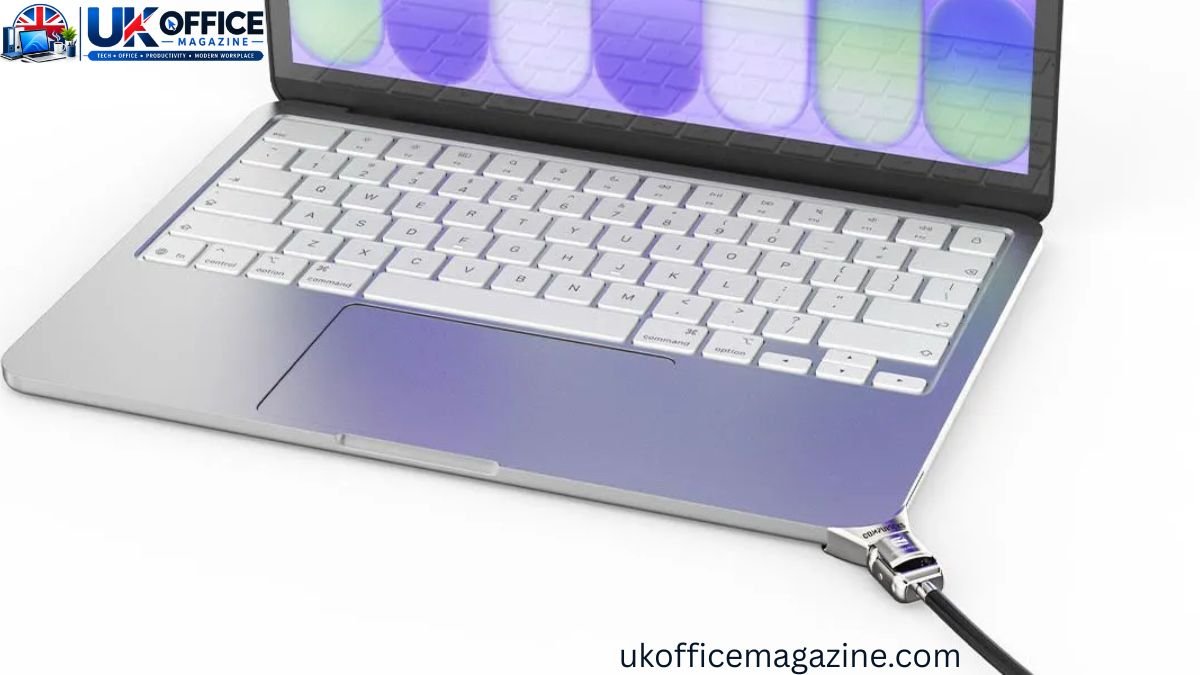
Working from a coffee shop feels great — until you glance up from your screen and your MacBook is gone. Laptop theft in cafes, co-working spaces, and airport lounges happens faster than most people expect, often in the few seconds it takes to order a refill or use the restroom. That’s exactly why a growing number of remote workers, freelancers, and students are turning to a MacBook lock — a physical security cable designed to tether your laptop to a fixed object so it can’t simply be picked up and walked away with.
This guide breaks down how MacBook locks work, why they matter more than ever for anyone working in public, and how to choose one that actually fits your device and your habits.
Why Coffee Shops Are a Theft Hotspot
Coffee shops are magnets for opportunistic theft because they combine three things thieves look for: distracted people, open seating, and an easy exit.
- Laptops are usually left unattended for “just a minute” while ordering or refilling a drink.
- Free Wi-Fi and comfortable seating attract remote workers who stay for hours, which means more windows of opportunity.
- Crowded, noisy environments make it hard to notice someone reaching over from a nearby table.
- Many cafes have multiple exits, so a thief can disappear before anyone reacts.
A MacBook, in particular, is a high-value target. It’s lightweight, instantly resellable, and easy to slip into a bag without drawing attention — which is why Apple laptop owners are frequently advised to add a layer of physical security on top of good habits.
What Is a MacBook Lock, and How Does It Work?
A MacBook lock is a security cable — usually made of braided or galvanized steel — that connects your laptop to a table, desk leg, or other fixed anchor point. One end attaches to the MacBook itself; the other end wraps around something immovable and is secured with a key or combination.
Since Apple laptops don’t include a built-in Kensington security slot like many Windows machines do, MacBook locks rely on alternative attachment methods, such as:
- Adhesive or bracket mounts that stick to the underside or edge of the laptop
- Vent-based locks that clip onto the MacBook’s air vent without tools or adhesive
- Port-based adapters that use the headphone jack or a spare port as an anchor point
- Locking stations that clamp the entire laptop chassis from the side
Types of MacBook Locks
| Lock Type | How It Attaches | Best For | Tool Required |
|---|---|---|---|
| Vent-mount cable lock | Clips into the air vent | MacBook Pro users who want a fast, damage-free setup | No |
| Adhesive slot adapter | Sticks to the laptop shell | Long-term desk setups, offices | Minimal |
| Locking station/dock | Clamps the laptop from the sides | MacBook Air and Pro, shared or fleet devices | No |
| Port-based cable lock | Inserts into headphone/USB port | Budget-friendly, universal use across devices | No |
Each option trades off portability, ease of installation, and how much force it can withstand, so the right pick really depends on where and how often you work in public.
Why MacBooks Need a Different Approach Than Other Laptops
Most Windows laptops have a small oval-shaped Kensington slot built into the frame, letting you plug in a standard lock in seconds. Apple’s minimalist industrial design leaves no room for that slot, so MacBook owners need an adapter-based or vent-based solution instead.
This is worth knowing before you buy, because a generic “universal laptop lock” won’t necessarily fit a MacBook without an adapter. Always check:
- Your exact MacBook model (Air or Pro, and screen size)
- Whether the lock requires drilling, adhesive, or is fully tool-free
- Cable length and material (look for cut-resistant, galvanized steel)
- Whether the lock blocks any ports you regularly use
Physical Lock vs. Software Security: What’s the Difference?
A cable lock and software protection solve two different problems — one stops someone from physically taking your MacBook, the other protects your data if they do.
| Feature | Physical MacBook Lock | Software/Alarm Protection |
|---|---|---|
| Prevents theft | Yes, deters grab-and-go theft | No, only alerts or tracks after the fact |
| Protects stored data | No | Yes (FileVault, Find My, passwords) |
| Works without internet | Yes | Usually needs Wi-Fi or cellular |
| Setup time | 1–2 minutes | A few minutes, one-time setup |
| Ongoing cost | One-time purchase | Often free (built into macOS) |
The smartest approach combines both: a physical lock to prevent theft in the first place, plus macOS features like FileVault disk encryption, a strong login password, and Find My Mac to recover the device or protect your data if it’s ever stolen.
Best Practices for Using a MacBook Lock in Public
Owning a lock only helps if you actually use it correctly. Keep these habits in mind:
- Loop the cable around something truly fixed — a table leg bolted to the floor, not a lightweight chair.
- Lock your MacBook even for “quick” breaks; most cafe thefts happen in under 60 seconds.
- Keep the key or combination separate from your laptop bag.
- Pair the lock with a privacy screen if you’re handling sensitive documents or client data.
- Position your seat so you can see the door and keep your laptop within your peripheral vision when unlocked.
How to Choose the Right MacBook Lock
- Confirm compatibility with your MacBook model and screen size before purchasing.
- Prioritize tool-free installation if you’ll be locking and unlocking multiple times a day.
- Check cable strength — look for cut-resistant, braided steel rated for public use.
- Decide between key and combination locks. Combination locks skip the risk of losing a key; keyed locks are often more resistant to tampering.
- Think about portability. A lighter, compact lock is easier to carry daily than a bulky locking station.
Additional Tips to Protect Your MacBook in Coffee Shops
- Enable Find My Mac in iCloud settings so you can locate or remotely lock the device if it’s ever taken.
- Turn on FileVault encryption so stolen data can’t be accessed without your password.
- Use a laptop bag with a hidden compartment rather than an obvious branded sleeve.
- Avoid leaving your MacBook visible on the table when you step outside, even briefly.
- Consider renter’s or gadget insurance that covers theft, since even the best lock isn’t 100% foolproof against a determined thief with cutting tools.
Conclusion
A MacBook lock won’t make your laptop theft-proof, but it removes the easiest opportunity a thief has — grabbing an unattended device and walking out. Combined with smart habits like enabling Find My Mac, encrypting your drive, and staying aware of your surroundings, a simple cable lock turns your coffee shop workspace into a much harder target. For anyone who regularly works remotely, it’s a small, one-time investment that buys real peace of mind.
FAQs
Do MacBooks have a built-in lock slot?
No. Unlike many Windows laptops, MacBooks don’t include a Kensington security slot, so you need an adapter, vent-mount, or locking station instead.
Can a MacBook lock be cut or bypassed?
A determined thief with bolt cutters could eventually cut a cable, but a visible lock deters casual, opportunistic theft, which is the most common type in cafes.
Is a physical lock better than Find My Mac?
They serve different purposes — a physical lock prevents theft, while Find My Mac helps you locate or remotely wipe the device after the fact. Using both is the safest approach.
What’s the best type of MacBook lock for coffee shops?
A tool-free, vent-mount or port-based cable lock is usually best for cafes since it’s fast to attach and detach multiple times a day.
Does locking my MacBook slow down my workflow?
Not significantly. Most tool-free locks take under a minute to attach or remove, which is a small trade-off for reduced theft risk.
Are MacBook locks compatible with all models?
Not always. Compatibility depends on your specific MacBook Air or Pro model and screen size, so check the product listing before buying.
